
Wallpaper Slideshow Pro 6 Released
March 2026 · Software Release · 4 min read
We are pleased to announce the release of Wallpaper Slideshow Pro 6. This update focuses on giving you greater control over how and when your wallpaper collections are displayed, with the introduction of startup and shutdown groups, per-monitor group assignments, a new PhotoWall layout, and several other improvements. Here is everything that is new.
Wallpaper Slideshow Pro has always been built around the idea that your desktop should reflect exactly what you want, when you want it — without manual intervention. Version 6 takes that principle further by introducing finer control over groups, the core feature that lets you organize your image collections and switch between them instantly. Whether you manage separate collections for work and home, maintain seasonal sets, or simply want to keep certain images private, the new group automation features in version 6 make the whole process seamless and entirely hands-free.
Startup and Shutdown Groups
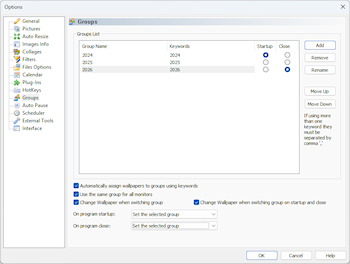
Wallpaper Slideshow Pro has long supported groups — named collections of images that you can switch between at any time from the system tray. Version 6 takes this further by letting you specify exactly which group should be active when the program starts and which group should be set when it closes. You will find these options in the Groups section of the settings window, under On program startup and On program close. The available choices are: keep the last used group, select a group randomly, set a specific group, or activate all groups at once. This seemingly simple addition unlocks a wide range of practical use cases, one of which is described in detail below.
Per-Monitor Startup and Shutdown Groups
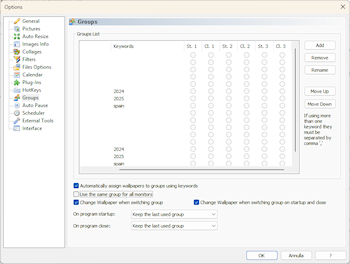
In multi-monitor setups, group preferences can now be configured independently for each display. When the option Use the same group for all monitors is disabled, you can assign a different startup group and a different shutdown group to each connected monitor. This means that on a dual-monitor or triple-monitor system, you can have each screen automatically switch to its own designated collection at startup and revert to its own designated safe set at shutdown — all without touching a single setting manually.
Display Two Portrait Images Side by Side
Wallpaper Slideshow Pro 6 adds native support for displaying two vertically oriented (portrait) photos side by side on a single monitor. Previously, displaying portrait images on a widescreen monitor often meant a significant amount of unused space on either side of the photo. With this new option enabled, the program automatically pairs two portrait images and places them together to fill the screen in a balanced and visually pleasing way. This works particularly well with smartphone photography, scanned prints, and any collection that mixes landscape and portrait orientations.
New PhotoWall Type and Orientation Control
The PhotoWall mode — which builds a mosaic of your photos to fill the entire desktop — now includes a new layout variant, giving you an additional option for how the grid is structured and spaced. Alongside the new type, version 6 also introduces the ability to choose the orientation of images displayed within the PhotoWall: you can now restrict the mosaic to landscape images only, portrait images only, or continue using the default mixed mode. This is useful when you want a visually consistent mosaic without having to reorganize your source folders.
Managing SFW and NSFW Wallpaper Collections Automatically
One of the most practical applications of the new startup and shutdown groups is keeping sensitive or adult-only images private in shared environments. The setup requires just a few minutes and works entirely automatically from that point forward.
Start by creating two groups in the Groups settings panel: one named SFW (safe for work) and one named NSFW. Then, in the main window, assign your folders to the appropriate group — point your general-audience photos to the SFW group and your private collection to the NSFW group. Finally, set On program startup to the NSFW group and On program close to the SFW group.
From this moment on, Wallpaper Slideshow Pro will automatically display your private collection when you launch it — which you do intentionally, in the right context — and will automatically switch back to your safe collection the moment you close the program or shut down. If someone else uses the computer after you, or if the machine restarts, the wallpaper on screen will always be from your SFW set. No hotkeys to remember, no manual switching, no risk of forgetting.
This same approach works equally well for other scenarios: a professional collection for office hours and a personal one for evenings, a minimalist desktop for presentations and a rich photo collection for personal use, or different seasonal sets for different times of year.
Try Wallpaper Slideshow Pro 6 for Free
Download the free 30-day trial and explore all the new features without any limitations. No registration required — just install and your desktop starts working for you immediately.
Already a Wallpaper Slideshow Pro Customer?
Check the upgrade page to find out whether your existing license includes a free upgrade to version 6 or qualifies for our discounted upgrade pricing.
