
Mouse Speed Switcher

Current Version: 5.0.2
Released: June 12, 2026
Upgrade Notice for registered users : All users who purchased Mouse Speed Switcher on or after January 1st, 2026 can upgrade to Mouse Speed Switcher 5.x free of charge. All users of previous versions can upgrade to the latest version at a reduced price. If you have further questions contact us
Mouse Speed Switcher has been released in two variants, 64bit and 32bit. 64bit is the main version and runs on all modern windows versions, 32bit variant should be downloaded only by uers with old 32bit versions of windows
If you are upgrading from version 3 it is advisable to uninstall the previous version. The 32bit installer will overwrite older versions.
The program works with all features enabled for 7 days. Then some features will be disabled and a reminder window will be displayed but the program will continue to work. Purchasing a license will remove all reminders and limitations.
After downloading, double-click the downloaded file in Windows Explorer to start the installer.
Mouse Speed Switcher v5.0.2 64bit
Mouse Speed Switcher v5.0.2 32bit
How to use it:

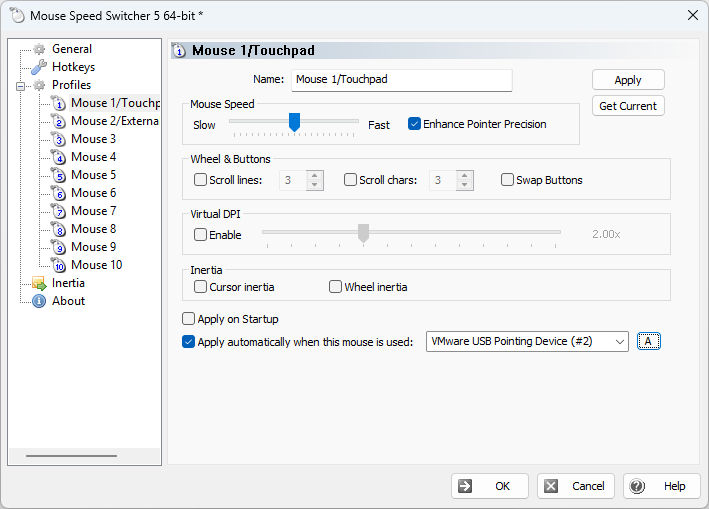
Right-click on the MouseSpeedSwitcher icon in the system tray and choose "Settings...". Move the sliders for "touchpad" and "external mouse" to the desired speed. Configure your preferred HotKey. Click on Ok and MouseSpeedSwitcher is ready to use ! Just press the hotkey you configured or double click on the tray icon and mouse settings will be switched.
Supported Operating Systems:
- Windows 11 (including all future versions and updates)
- Windows 10 (including all future versions and updates)
- Windows 8.1
Previous versions
Here are previous Mouse Speed Switcher versions, download them only if you already purchased a 3.x version and don't wish to upgrade.


