
gPhotoShow Pro 11 Released
March 4, 2026 · Software Release · 3 min read
We are excited to announce the release of gPhotoShow Pro 11, the biggest update in years. Version 11 brings a brand new DirectX 11 rendering engine, stunning visual effects like Cinematic and Atmospheric Dust, and several new display modes. Here's everything that's new.
gPhotoShow Pro 11 is the result of months of development focused on one goal: making your photo slideshows and screen savers look better than ever, while running faster and more efficiently on modern hardware. This release introduces a completely redesigned rendering engine based on DirectX 11, three brand-new visual effects, two new display modes, and a series of improvements requested directly by our users. Whether you use gPhotoShow as a personal screen saver, a digital photo frame, or a professional display solution, version 11 has something new for you.
DirectX 11 Hardware Accelerated Rendering
The most significant change under the hood in version 11 is the complete migration of the hardware-accelerated rendering engine from DirectX 9 to DirectX 11. This means smoother transitions, lower CPU usage, and better compatibility with modern display adapters and high-resolution monitors — including 4K screens and multi-monitor setups. Users with recent hardware running Windows 10 or Windows 11 will immediately notice the difference in rendering quality and responsiveness. The DirectX 9 variant remains available for users with older systems.
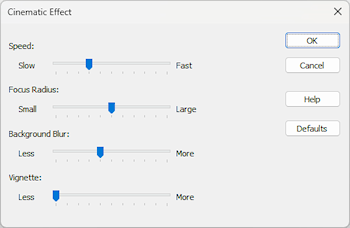
Cinematic Effect
The new Cinematic Effect transforms your photos into something that feels like a frame from a film. A subtle combination of vignetting, gentle film grain, and color grading is applied as an overlay during the slideshow, giving even everyday snapshots a polished, cinematic quality. It works beautifully on landscape photography, portraits, and travel photos, and pairs naturally with the Pan and Zoom (Ken Burns) animation to create a truly immersive viewing experience. No editing software required — gPhotoShow applies the effect in real time.
Atmospheric Dust Effect
The Atmospheric Dust Effect adds a layer of slowly drifting particles over your images during playback, simulating the soft, warm quality of light you see in sunlit rooms or old film projections. The particles react gently to the image transitions, creating a sense of depth and atmosphere without distracting from the photos themselves. This effect works particularly well with vintage collections, family archives, and nature photography, and is fully independent from other effects
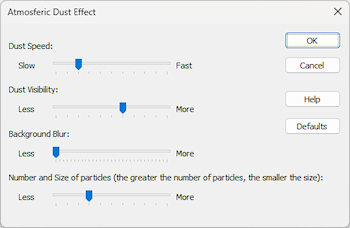
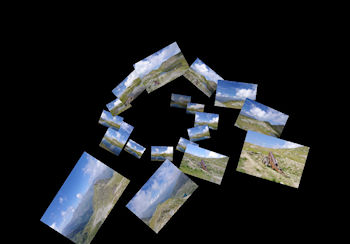
Photo Tunnel
Photo Tunnel is a new display mode that presents your images through a dynamic perspective tunnel effect, drawing the viewer's eye toward the center of the screen as photos appear and recede. It creates an immediate visual impact that makes it ideal for lobby displays, trade show screens, museum installations, or any situation where you want your slideshow to attract attention from a distance. Like all display modes in gPhotoShow Pro, Photo Tunnel can be combined with your existing folder structure and file filters without any additional configuration.
File and Plugin Information Overlay on Videos
One of the most requested features from our community is now available: file information and plugin data — including custom captions and data from installed plugins — can now be displayed as an overlay during video playback, just as they have always been available for photos. This is particularly useful for users running gPhotoShow as a digital photo frame or as part of a home automation setup, where keeping consistent information on screen across both photos and videos matters. The overlay is fully configurable using the same settings available for image captions.
New Static PhotoWall Type
The PhotoWall mode — which displays a mosaic of your photos filling the entire screen — now includes a static variant. Unlike the original scrolling PhotoWall, the static version builds the mosaic and holds it in place, creating a visually rich, gallery-style display that works exceptionally well in environments where constant motion would be distracting: waiting rooms, conference backgrounds, retail spaces, and corporate lobby displays. The number of photos displayed, their sizing, and spacing are all configurable through the standard PhotoWall settings.
Slideshow Cover Images
Version 11 introduces the ability to assign a dedicated cover image to each slideshow configuration. When multiple slideshows are saved and available for selection — for example when using gPhotoShow with a remote control plugin or in a home theater setup — the cover image makes it easy to identify and select the right collection at a glance. Cover images are stored alongside the slideshow settings and do not affect the photos displayed during playback.
New Transition Effects
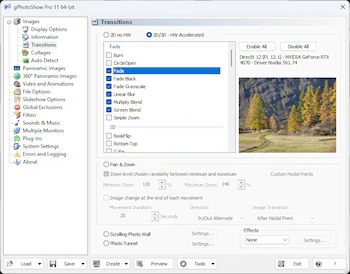
Several new transition effects have been added to gPhotoShow Pro's already extensive library of 2D and 3D GPU-accelerated transitions. The new effects expand the visual vocabulary available for your slideshows and screen savers, offering additional options for both subtle and dramatic scene changes. As with all transitions in gPhotoShow Pro, the new effects are fully configurable in terms of speed and can be mixed with existing transitions for a varied, non-repetitive viewing experience.
Try gPhotoShow Pro 11 for Free
Download the free 30-day trial and explore all the new features at your own pace. No registration required, no credit card needed — just download, install, and start building your slideshow.
Already a gPhotoShow Pro Customer?
If you purchased gPhotoShow Pro previously, check our upgrade page to find out whether your license includes a free upgrade to version 11 or qualifies for a discounted upgrade price.
