Page 1 of 2
gPhotoShow Pro Weather Plugin
Posted: Sat Nov 19, 2022 6:30 am
by footloose
Hi:
I've been successfully running gPhotoShow Pro 7.4.2.875 for years on my PC and it's never been problematic.
Now I installed it on my new laptop with exactly the same settings, but the weather plugin's not working correctly. Rather than displaying the New York weather, the city I input, it displays New City weather, no matter what city is input, such as Dallas, Tx, or Miami, Florida.
I tried reinstalling everything, but the same problem persists. How can this be fixed? Please see attachments.
Thanks
Re: gPhotoShow Pro Weather Plugin
Posted: Sat Nov 19, 2022 9:42 pm
by gpb
Hello,
error 12029 means connection failed because encrypted communication could not be established
This could happen on old windows versions (for example winows 7) that have not been updated. It is also possible connection is blocked by a firewall or another security software
Re: gPhotoShow Pro Weather Plugin
Posted: Sat Nov 19, 2022 10:30 pm
by footloose
Thank you for your reply, but I'm running Windows 11 on a brand new HP laptop.
I also tried running gPhotoshow with the firewall disabled and I still get the same error.
Regarding Windows 7, I never had a problem with gPhotoshow on it.
How do I fix this?
Re: gPhotoShow Pro Weather Plugin
Posted: Mon Nov 21, 2022 5:12 pm
by gpb
On Windows 11 the plugin works well, the error code suggests the plugin is not able to connect to the server but it's hard to guess the reason. It could be something on the pc or a network issue
Did you try all 3 weather providers ?
Re: gPhotoShow Pro Weather Plugin
Posted: Mon Nov 21, 2022 6:57 pm
by footloose
Yes, I tried all 3 plugins and checked for updates. Nothing in gPhotoshow connects to the server.
Re: gPhotoShow Pro Weather Plugin
Posted: Tue Nov 22, 2022 8:53 am
by gpb
Yahoo weather api has been retired, it doesn't work any longer
About connection issues I can only repeat to check your computer, firewall, antivirus or any other security program may prevent programs from connecting to internet. Also some windows updates are needed to correctly connect using SSL protocol but this could be a problem only if you stopped automatic updates.
Re: gPhotoShow Pro Weather Plugin
Posted: Wed Dec 07, 2022 3:20 am
by footloose
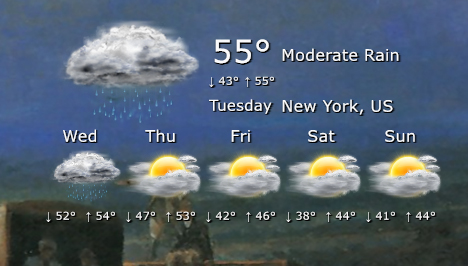
Finally, but unfortunately without being able to explain why, gPhotoshow is connecting and displaying the weather as it always did. I wish there were a way to know what was temporarily wrong that it wouldn't connect.
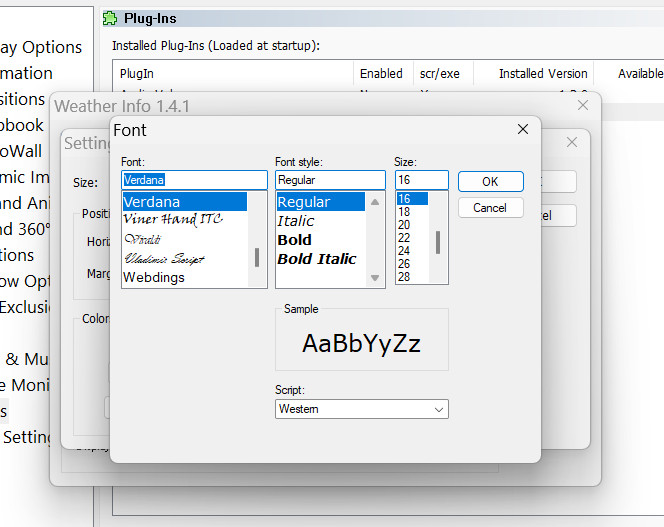
There is one issue, however. Whatever
font size chosen for the temperature display, it is disregarded and the setting reverts back to
font size 16 regular, no matter what size and weight it's set at. Is it supposed to be this way only,
font size 16 regular?
- weather-display.jpg (107.59 KiB) Viewed 185640 times
- font-face-settings..jpg (99.56 KiB) Viewed 185645 times
Re: gPhotoShow Pro Weather Plugin
Posted: Wed Dec 07, 2022 10:53 am
by gpb
footloose wrote: Wed Dec 07, 2022 3:20 am
There is one issue, however. Whatever
font size chosen for the temperature display, it is disregarded and the setting reverts back to
font size 16 regular, no matter what size and weight it's set at. Is it supposed to be this way only,
font size 16 regular?
Font size is not used because it is automatically calculated to fit text inside the weather pane. If you wish bigger text you must set a bigger size in the settings dialog, the panel will be bigger and also the text will be bigger
Re: gPhotoShow Pro Weather Plugin
Posted: Wed Dec 07, 2022 8:20 pm
by footloose
Thank you. Glad to know it's working properly.
RE: gPhotoShow Pro Weather Plugin
Posted: Fri Dec 19, 2025 7:03 am
by MadNav
Hello and Happy Holidays,
Enjoying this marvelous hidden gem of an app and currently have a test run of great grief on my comp to see if I can break it after tweaking some settings that caused my last test run to crash 5 minutes prior to my 12 hour check.. anyways, I believe that issue is resolved after tweaking some file extensions and VLC media handler integration .. fingers crossed on that ;D
Point being is that I'm staring at the Weather knowing it's a lot colder than what the current selected provider is propagating.

do you locate the API syntax for the different providers in the drop down list? And, secondly, could an add custom provider API be included in the Weather plug-in?
Almost posted in website and forum discussion about adding more tutorials for plug-in .. but after going through the forum this would be a great place to break the ice.
Peace on Earth and all that Everyone ,
DaveZnotHere!
 do you locate the API syntax for the different providers in the drop down list? And, secondly, could an add custom provider API be included in the Weather plug-in?