I bought a full license after testing the software a little and it looked at first like it can do exactly what I want.
But now I am stuck and am not sure if I just cant find the correct settings, or if the current version cant do it like I want it to be.
I was searching for a software that can:
Create a collage of pictures from a folder automatically.
If there are many pictures, split them up to many collage pages that are displayed one after another.
This software can do all that and more.
I also liked that I can create Exe files that just can play the collage I configurated.
My problem is, that I can not set up the collage as I want it to be.
The closest to what I want is the "Scrolling Photo Wall" (Under Transitions).
After that comes "Static Photo Wall 2".
But for me the pictures displayed are cropped to much in Static Photo Wall 2. Some pictures are not recognizable anymore.
is really bad with the cropping, so its useless for me.
Changing a landscape picture with aspect ratio from 16:9 to something like 16:5 cropping top and bottom of the picture, leaving only around half of it.
The other mode Static Photo Wall 1 is even worse.
What I want to archive is:
Display more than 1 picture at the same time on the screen.
Pictures should not overlap or be rotated.
Cropping should be at a minimum (max 10% on all sides)
What I see is, that the software tries to fill out the area of the display to 100%, so the pictures are cropped as much as needed to fill out everything.
I would be OK with empty space areas if the pictures are just nor massacred so much.
There is an option in "Display Options -> Fill empty space with backround color" it is selected but does nothing...
I was hoping to get the software to only display pictures in portray mode next to each other like 1 or 2 rows by 3or4 columns.
For pictures in landscape 2x2 or also 2x3 and so on.
Or mix them up like 1 Portray in left and 1 on the right side and in center 2x2 Landscape pictures. Fill everything empty with black. (I have a Ultra Wide Screen so that would fit great)
The rolling wall does that in some sense, to make it fit at the start, some pictures are display only partially (Like cropped) and rest of the picture is out of frame rolling in with time.
But I would prefer to have a complete mosaic on the screen that gets switched out with another complete mosaic. (Instant next set of pictures)
I also checked the FAQ and found somthin that sounded similar to what I want and tried to setup it up like described there "Multiple Monitors -> Split Screen (Horizontal 5 : Vertical 2).
Under Collages I set the Type to None. That way I was able to force it to display one complete picure in each slot.
But I can not change out all pictures at the same time or set the speed. So I have 10 Pictures and one after another is changed really slowly....
In the past I used TurboCollage to create single collage pages out of my pictures and then let them run as a Dia show.
But it is so time consuming to create them manually, so I searched for an alternative and found this program.
It looks really promising, but the cropping is just to much for me.
As I said, maybe I just cant find the correct settings.
So my Suggestions / Requests would be:
#1 Being able to really limit the amount of cropping and accepting empty spaces. (For example, copping max 10% or No cropping at all)
#2 Setting fixed frames that get filled with pictures. Like 2x3 , 3x6 , then the pictures are inserted in these frames without cropping.
Like having templates I can choose to select. Define were Portray and Landscape pictures should be inserted.
For example:
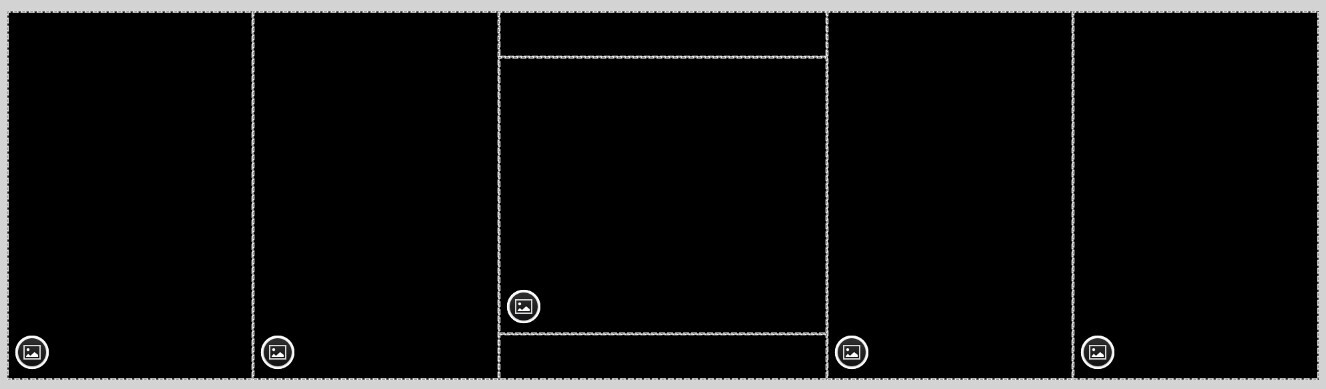

I know it would be dificult to let the user freestyle them themselfs, what I mean is that in the Prog exist like 10 Version and the user can select with checkboxes the versions he likes and then the Program used them.
Other stuff I noticed that would be nice but are not that big of a deal
#3
When adding a new path.
Being able to copy and paste a path directly to jump directly to that location.
Currently you need to click yourself through the path.
My content I want to use with XXX is saved on many different locations.
Switching from one drive to another is tedious.
It would be great to just be able to paste the correct path like: G:\Backup HDD1\Privat\Vacation\Pictures
#4
Being able to set a picture as Icon for the Exe file would be nice.
As default, the first picture in the folder (sorted by name) that is used to create the Exe could be displayed as the Icon.
Optional the possibilty to set a specific picture as the Cover Icon.
To add some context.
I like to sometimes see my vacation pictures to refresh my memory.
I do not want to check and inspect 100+ picture one by one checking every detail in it.
Looking at many pictures at the same time will refresh my memory and makes me happy thinking back.
Some pictures are more interesting than others, so if I see many at the same time I focus on the interesting ones, till the next set is displayed.
Checking my vacation pictures like this, is a lot more fun and quicker than a normal Dia Show.
And this software has the functionality to do this without me needing to manually create each collage page one by one.
I just need the possibility to prevent/reduce the cropping.
Just for example. I tested it with a folder containing the pictures of a marriage.
On startup there was a picture of our group. Only the people in the center were left and the people on the sides were cropped out.
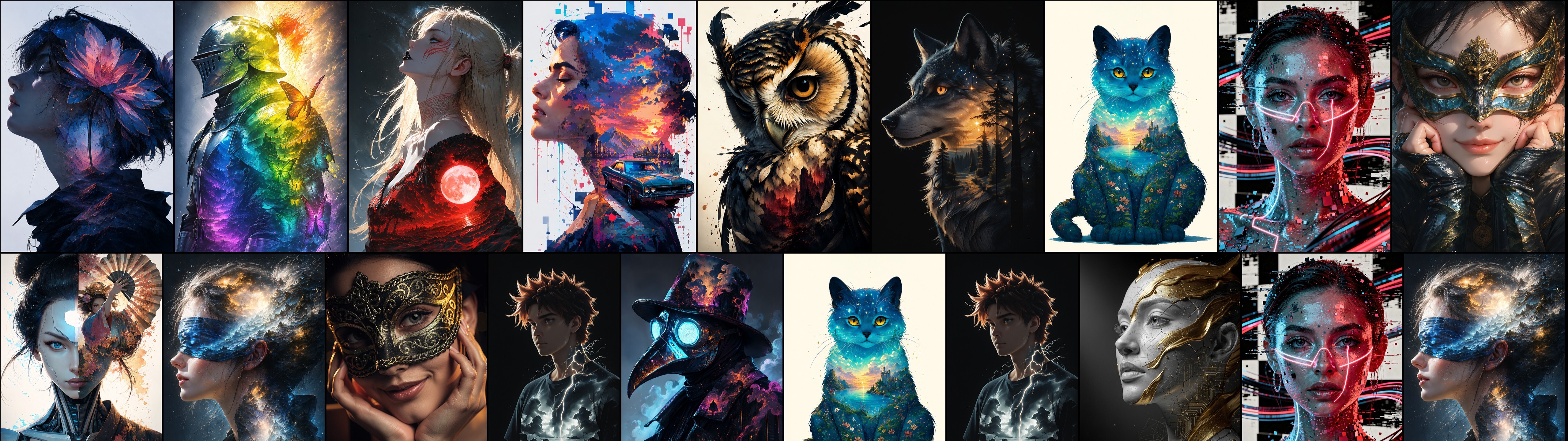
I used some AI Pictures just to show what I mean here. All pictures are in Portay mode, no Landscape.
This is the Scrolling Photo Wall. What is cut of will be scrolling in with time, but it looks already good from start up.
Thats how I would want it as collage pages. Even with picture sets that are mixed with Portay and Landscape it looks good:
This is Collage -> Static Photo Wall 2. Some of the pictures are cut of a lot.
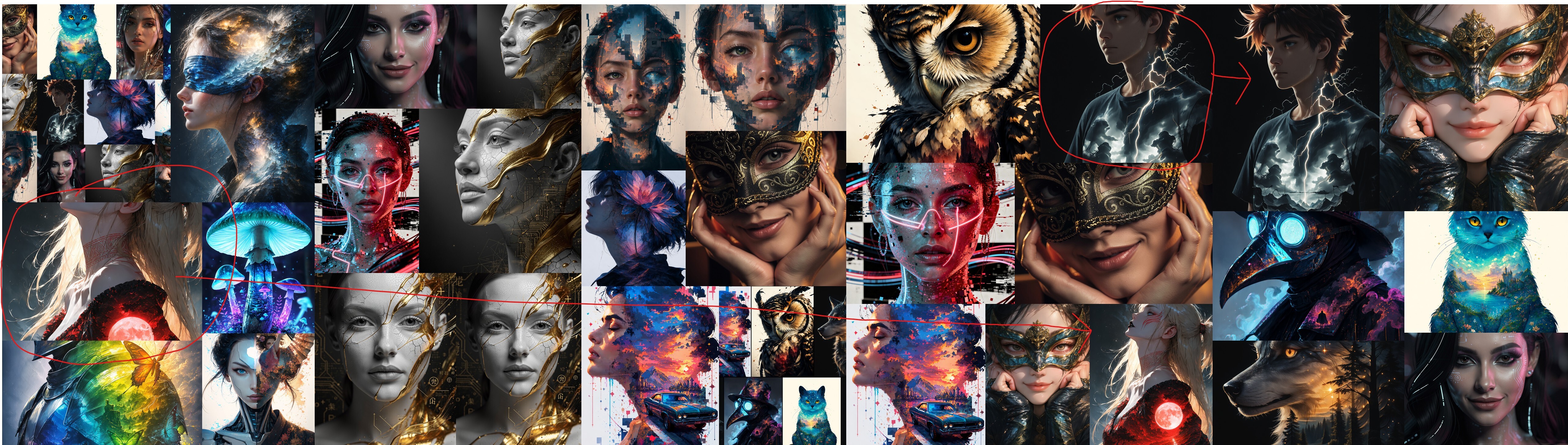
On the left side in both pictures is a colorfull knight. In top picture you see him, in be below picture you would not know what it is.
Most of the pictures are a Face and the center of the pictures is still visible after cropping. So they seem not so bad here in these pictures.
But each picture were the important part is not perfectly in the center is messed up. Like many real live pictures are.
Like the knight or that Girl that got her face cut of and you only see her neck and sholder.
I really hope there is a way to set it up, or a future update will add this.
For now I have to choose to do a manual collage with another Program and spend a lot of time. Or use the Scrolling Photo Wall as a compromice and wait till the picture are comply in screen.
Sorry for the long text and thank your for reading.
Have a nice day.
