How to use gPhotoShow to build a digital picture frame - Part 4
gPhotoShow PlugIns
With gPhotoShow Pro I installed the following plugins: Monitor On/Off, Weather, MQTT

Monitor On/Off
This PlugIn is useful to turn off the system during the night. For now I configured it to just turn off the monitor because it is the component that consumes more power, the mini pc just consumes 3 watts. Anyway the plugin allows you to set system to sleep (standby) and wake up automatically.

Weather
This plugin simply displays current weather conditions and forecasts

MQTT
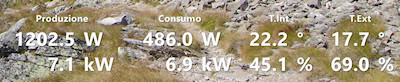
I have an MQTT broker installed on a Raspberry PI, this components collects data from power consumption, power production of photovoltaic system and various other appliances. I developed this plugin to integrate the picture frame in the system so it can display values coming from the appliances and accept commands from a smartphone

Here is the configuration of photovoltaic production display

Display Settings:

And here is how the display looks like: