Wallpaper Slideshow LT - Free Wallpaper Changer for Windows
Automatically refresh your Windows desktop with your favorite photos. Wallpaper Slideshow LT is a free wallpaper changer for Windows 11, Windows 10, Windows 8.1 and Windows 7 that can rotate pictures on a schedule, at startup or whenever you choose.
Add individual pictures or entire folders, arrange them in any order and let Wallpaper Slideshow LT display them randomly or sequentially. Flexible resizing, multi-monitor support, per-image settings and convenient system tray controls make it easy to build a desktop wallpaper slideshow that fits the way you work.
Current Version: 1.8.0
Released: July 28, 2026
Free automatic desktop wallpaper changer for Windows PCs and multi-monitor systems.
What's New in Wallpaper Slideshow LT 1.8.0
- Dark Mode: a comfortable dark interface that follows the Windows appearance and is easier on the eyes in low-light environments.
- New Auto Fit mode: fill the entire screen by stretching the picture or cropping it
- Blurred Auto Resize background: when a picture does not fill the screen, the empty borders can be filled with a softly blurred copy of the same image.
- Improvements and bug fixes: better compatibility, reliability and user interface behavior across supported Windows versions.
Wallpaper Slideshow LT Features
Automatic wallpaper changes
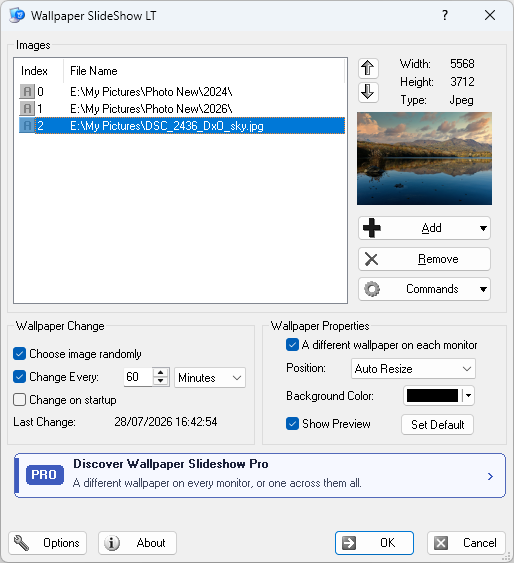
Change your desktop background automatically after a configurable number of seconds, minutes, hours or days. Wallpaper Slideshow LT can also change the wallpaper when Windows starts.
Random or sequential photo rotation
Display an unlimited list of pictures randomly or in sequence. Reorder items with drag and drop and keep your wallpaper collection organized from one simple window.
Auto Resize with optional blurred borders
Fit the complete image on screen without changing its aspect ratio. If the remaining borders are distracting, fill the desktop with a blurred version of the same picture instead of a flat background color.
Auto Fit with stretch or crop
Fill the display edge to edge. Choose Stretch to match the screen dimensions or Crop to preserve the image proportions while trimming only the areas that extend beyond the desktop.
Folders, files and automatic folder scanning
Add individual images or folders and optionally scan folders for newly added pictures. Files and folders can also be dragged directly from Windows File Explorer.
Multi-monitor wallpaper support
Use Wallpaper Slideshow LT on dual-monitor and multi-monitor PCs. Show a different wallpaper on each display and make better use of every screen in your workspace.
Popular image formats and EXIF rotation
Display JPEG/JPG, PNG, GIF, TIFF and BMP images. Photos containing EXIF orientation information are rotated automatically so portrait and landscape pictures appear correctly.
Per-wallpaper display settings
Choose the position and background color for individual wallpapers, preview the selected image and use high-quality resizing for a clean result at different screen resolutions.
System tray controls
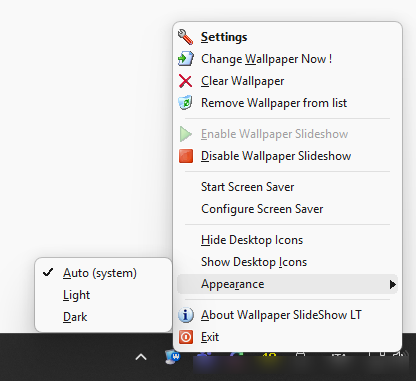
Keep the application out of the way and control wallpaper changes from its notification area icon. Move forward or back, pause automatic changes or open the configuration window when needed.
Dark Mode for modern Windows desktops
The configuration window supports Dark Mode for a more comfortable experience alongside dark Windows themes, while retaining compatibility with older supported systems.
Why Use Wallpaper Slideshow LT?
Enjoy more of your photo collection
Turn folders full of travel pictures, family photos, artwork or landscapes into an automatically changing desktop background.
Keep every monitor fresh
Rotate wallpapers across a multi-monitor workspace and display a different picture on each connected screen.
Choose exactly how images fit
Keep the complete photo visible, fill unused space with a blurred background, stretch the image or crop it to cover the screen.
How It Works
1
Add pictures and folders
Select individual image files, add complete folders or drag your wallpaper collection from File Explorer.
2
Choose timing and display mode
Set the change interval, select random or sequential order and choose Auto Resize, Auto Fit, Center or Tile.
3
Let the slideshow run
Wallpaper Slideshow LT works from the system tray and automatically keeps your Windows desktop updated.
System Requirements
- Windows 11 or Windows 10
- Windows 8.1
- Windows 7 SP1 or later
- Supported formats: JPEG/JPG, PNG, GIF, TIFF and BMP
Frequently Asked Questions
Download Wallpaper Slideshow LT V. 1.8.0
Download Wallpaper Slideshow LT and create an automatic desktop wallpaper slideshow from your own pictures. Configure timing, image order, Auto Resize, Auto Fit and multi-monitor options in just a few steps.
Screen Shots