
Control Screen Saver – Free Screen Saver Manager for Windows
Take control of your screen savers. Control Screen Saver (ControlSS) is a small, free system-tray utility that lets you start, enable, disable, choose and schedule your Windows screen savers with a single click — without ever opening the Windows display settings.
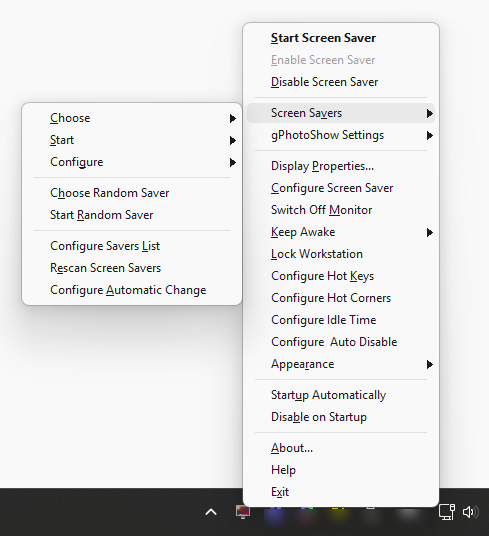
ControlSS lives quietly in the notification area near the clock. Double-click to start the screen saver, left-click to enable or disable it, and right-click for a complete menu of options: pick the active saver, start a random one, rotate them automatically, assign global hot keys and hot corners, keep the computer awake, lock the workstation and much more.
Current Version: 2.0.2
Released: September 29, 2026
Download – it's free See all features
Free for personal and commercial use. No adware, no bundled software.
Features
One-click tray control
Start, enable or disable the current screen saver straight from the system tray icon — or with a quick double-click. The tooltip always shows the active saver and its status.
Choose, start & configure any saver
Select the default Windows screen saver, start any installed saver on demand, or open its settings — all from a tidy, alphabetically grouped menu.
Random & automatic change
Pick or start a random screen saver, and let ControlSS rotate it automatically on startup, after each run, or on a schedule (for example once a day) to keep your desktop fresh.
Global hot keys & hot corners
Assign system-wide keyboard shortcuts — and trigger actions by moving the mouse into a screen corner — to start the saver, lock the workstation, switch off the monitor or toggle the screen saver.
Custom idle time & Auto Pause
Start the screen saver after your own idle timeout — even when another application has disabled it — and automatically pause it while chosen programs (media players, presentations) are running.
Keep Awake New
Temporarily prevent the screen saver and stop the display and system from sleeping — for 30 minutes, 1 or 2 hours, until midnight, or indefinitely. Perfect for presentations, downloads and long-running tasks.
Lock workstation & switch off monitor New
Lock your PC or turn the monitor off instantly from the menu, a hot key or a hot corner — handy shortcuts you'll use every day.
Light & dark menu, startup options New
The menu can follow the Windows light/dark theme or be forced to either. ControlSS can run at Windows startup, optionally disabling the screen saver as soon as it loads.
gPhotoShow integration
When used with gPhotoShow, ControlSS switches slideshow sets (.gss files) manually or automatically, so you can organise your photos and videos into categories.
64-bit, high-DPI & clean install
A native 64-bit build, crisp on high-DPI displays, with a straightforward installer and uninstaller and no bundled extras.
Who is it for?
Everyday users
Anyone who wants quick, one-click control of Windows screen savers without digging through system settings.
Presenters & kiosks
Keep the screen awake during a talk or a demo, or make sure the right screen saver starts on an unattended display.
gPhotoShow users
Control the gPhotoShow slideshow, switch photo sets and access the desktop while the screen saver is running.
How it works
1
Install & run
ControlSS adds an icon to the system tray. There is nothing to configure to get started.
2
Set your savers
Build your list of screen savers, pick the active one, or enable automatic change.
3
Control instantly
Use the tray menu, hot keys or hot corners to manage the screen saver any time.
System requirements
- Windows 11, Windows 10, Windows 8.1 or Windows 7 (SP1 or later)
- 32-bit and 64-bit editions supported (native 64-bit build)
- A few megabytes of free disk space
Download Control Screen Saver V. 2.0.2
Control Screen Saver is completely free. No adware, no bundled software, no sign-up — just download, run and take control of your screen savers.


